vue操作websocket
text
initWebSocket() {
      //初始化weosocket
      let wsuri = "ws://106.13.98.231/chat/" + this.workId;
      this.websock = new WebSocket(wsuri);
      this.websock.onmessage = this.websocketonmessage;
      this.websock.onopen = this.websocketonopen;
      this.websock.onerror = this.websocketonerror;
      this.websock.onclose = this.websocketclose;
    },
    // 开启时
    websocketonopen() {
      //连接建立之后执行send方法发送数据
      this.websocketsend(JSON.stringify(this.contentText));
    },
    // 连接错误时
    websocketonerror() {
      //连接建立失败重连
      this.initWebSocket();
    },
    // 接受信息时
    websocketonmessage(e) {
      //数据接收
      if(JSON.parse(e.data)!==''){
         this.list = [
        ...this.list,
        { type: "he", content: JSON.parse(e.data) }
      ];
      }
    },
    // 发送信息时
    websocketsend(Data) {
      //数据发送
      this.websock.send(Data);
      // 清空输入框
      this.contentText = "";
    },
    // 连接关闭时
    websocketclose() {
      this.$message({
        message: '连接已断开',
        type: 'warning'
      })
    },

    //发送聊天信息
    sendText() {
      let that = this;
      if (this.contentText.trim() !== "") {
        //通过type字段进行区分是自己(mine)发的还是对方(he)
        this.list = [...this.list, { type: "mine", content: this.contentText }];
        this.websocketonopen();
      } else {
        this.$message({
          message: "请输入内容",
          type: "warning"
        });
      }
    }
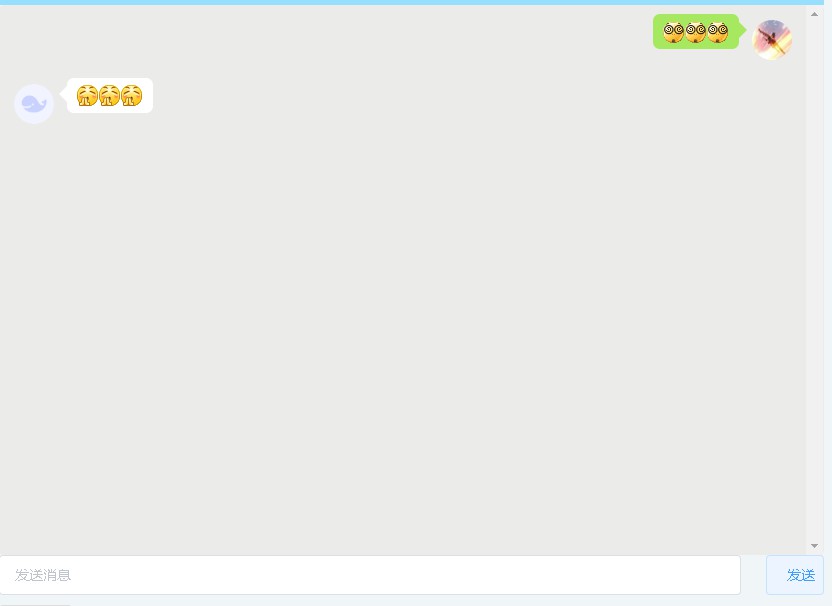
通过给聊天数据设置自定义属性,用于判断这条数据是自己发的还是接受对方的。然后根据不同自定义属性使用不同的css样式。
text
 <div class="triangle" ref="box">
          <ul v-for="(item,index) in list" :key="index">
             <li :class="item.type==='he' ?  'textLeft': 'textRight'">
               <span :class="item.type==='he' ?  'leftspan': 'rightspan'" v-html="analyzeEmoji(item.content)">{{analyzeEmoji(item.content)}}</span>
               <img :src="item.type==='he' ? robotIcon : User.avatarUrl" alt="" class="usericon" :class="item.type==='he' ?  'left': 'right'">
             </li>
          </ul>
</div>
进而实现如下样式